ROB RUN AssistPerspective view, auto-aiming, item visibility, and radar map centralized management tools
Using proprietary kernel encryption technology, it integrates scattered battlefield information into your screen, from character skeletal and character faction data, handheld weapons and real-time distance, to high-value materials, vehicle status, and directions outside the screen, giving you a comprehensive view.
- Function independent switch
- Distance and color filtering
- Middle East Options and Configuration Management
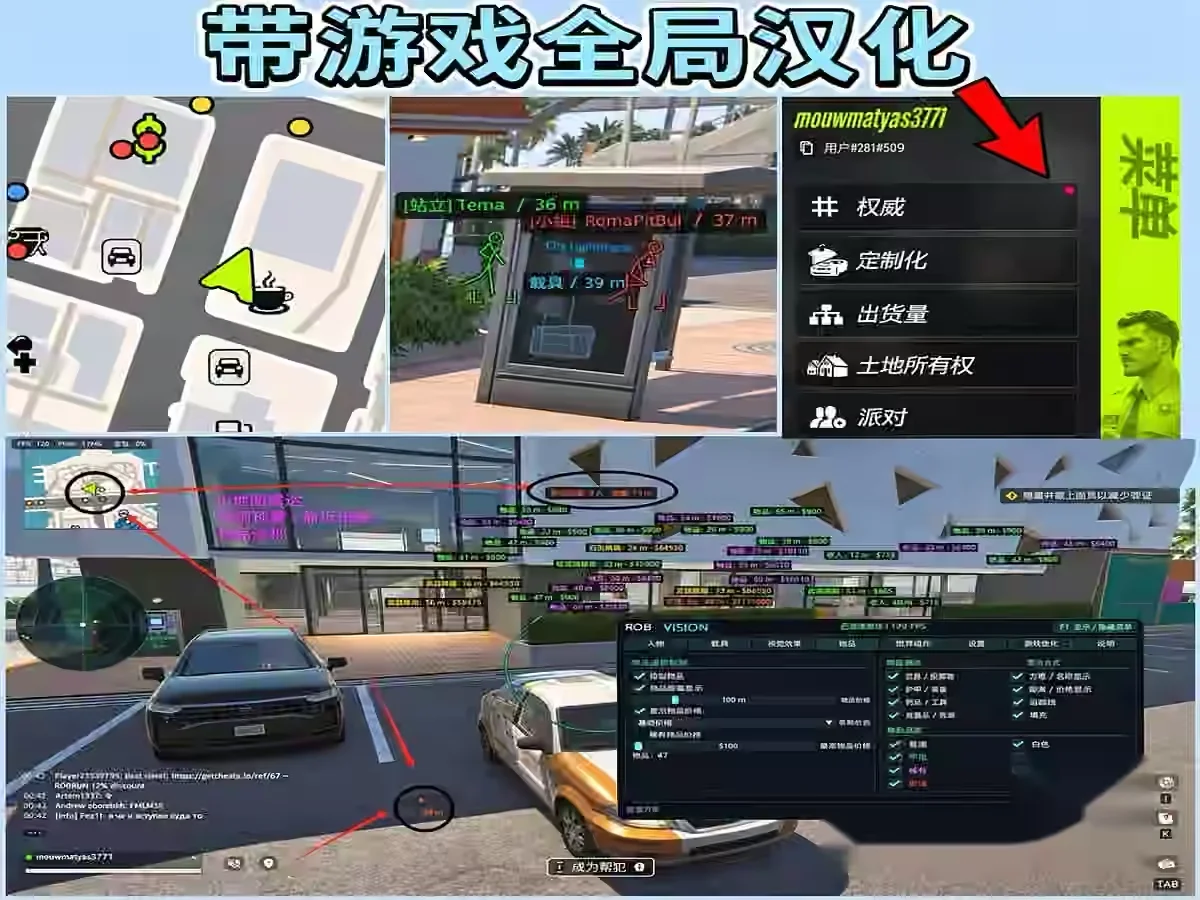
What is ROB RUN Assist?
ROB RUN Assist is a third-party tool designed around information visualization, targeting parameters, and battlefield perception. The character perspective is used to display the character's position and state, the item perspective is used to mark loot and value, and the radar map is used to aggregate surrounding directions. The self-aim module provides options for target filtering, FOV, smoothness, and aiming location.
In confrontations between police officers, criminals, civilians, and NPC, what matters is not just seeing, but quickly determining who is worth paying attention to, what items are worth picking up, and which information can be temporarily hidden. Distance restrictions, faction filtering, and independent color settings can reduce the interference of irrelevant markings on the field of view.
Detailed explanation of the ROB RUN core functions
From person recognition to material search, each item of information can be controlled independently. The following features are based on screenshots from real-world devices and supplement commonly configurable options; actual available features are based on the current compatible version.
Personification ESP
By displaying surrounding characters through bounding boxes, skeletal markings, head tags, and lines, you can also add names, factions, gangs, distances, health, armor, hand weapons, and status. When characters are obscured by walls or buildings, you can still read their location and changes through the selected markings.
Self-aiming Aimbot
Provides settings for enabling key functions such as target location, priority, maximum distance, FOV range, and smoothness. You can filter targets based on star distance or person distance, and combine them with visibility checks, target lock, and motion prediction to reduce the interference caused by frequent switching of targets during combat.
Object perspective and value display
Mark weapons, ammunition, armor, equipment, cash, goods, containers, and supplies, and display item names, distances, or reference values. Use categories, maximum distances, and hidden empty containers to focus on the resources you need at the moment.
Radar maps and direction guidance
Aggregate surrounding characters, factions, and vehicles into a separate radar view, and read direction using distance rings, field of view zones, zoom, and transparency. Arrow outside the screen indicates the direction of the target outside the field of view, reducing the need to frequently rotate the view to find markers.
Vehicle, NPC, and camera perspective
In addition to players, NPC, vehicles, and cameras can also be displayed in categories. Vehicle information can include name, distance, speed, driver, owner, and occupancy status; cameras can distinguish between normal, damaged, and alert states, and display the direction of observation or the area of view.
Screening of camps and targets
It displays in categories of police, criminals, civilians, NPC, teammates, or gang members, and allows you to hide targets lying down, dead, or in vehicles. Different factions can configure separate colors to keep the visibility, radar, and crosshair filtering consistent.
Weapon and shooting parameters
Common weapon settings include rear-sight adjustment, ballistic spread, and lens shift adjustment, and different aiming parameters can be saved by weapon category. The FOV circle, target lock prompt, and predictive markings can assist in confirming the scope of the current setting.
Chinese menu and configuration management
The Chinese options reduce the cost of understanding of individual settings; characters, visuals, aiming, radar, and color classification are clear. The menu scaling, dark/light theme, streamlined combat information, and the save configuration feature make it easy to quickly recall existing options in different usage scenarios.
Real-time effects: characters, weapons, and distance displayed on one screen
The information overlay not only displays a box, but also combines the character’s skeletal structure, character identity, real-time distance, hand-held weapons, and item value; you can also close categories that you don’t use temporarily when you need a more concise view.
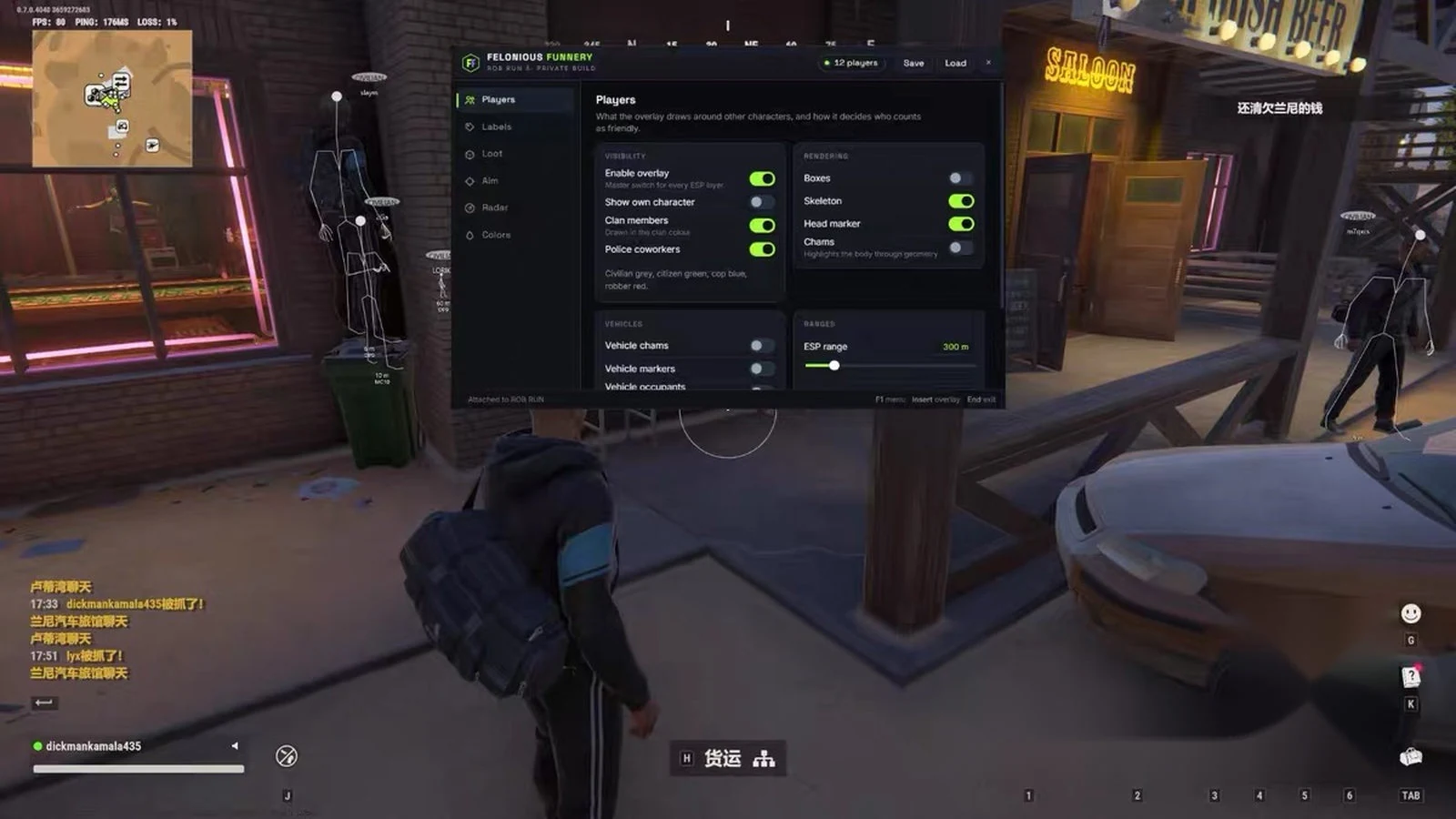
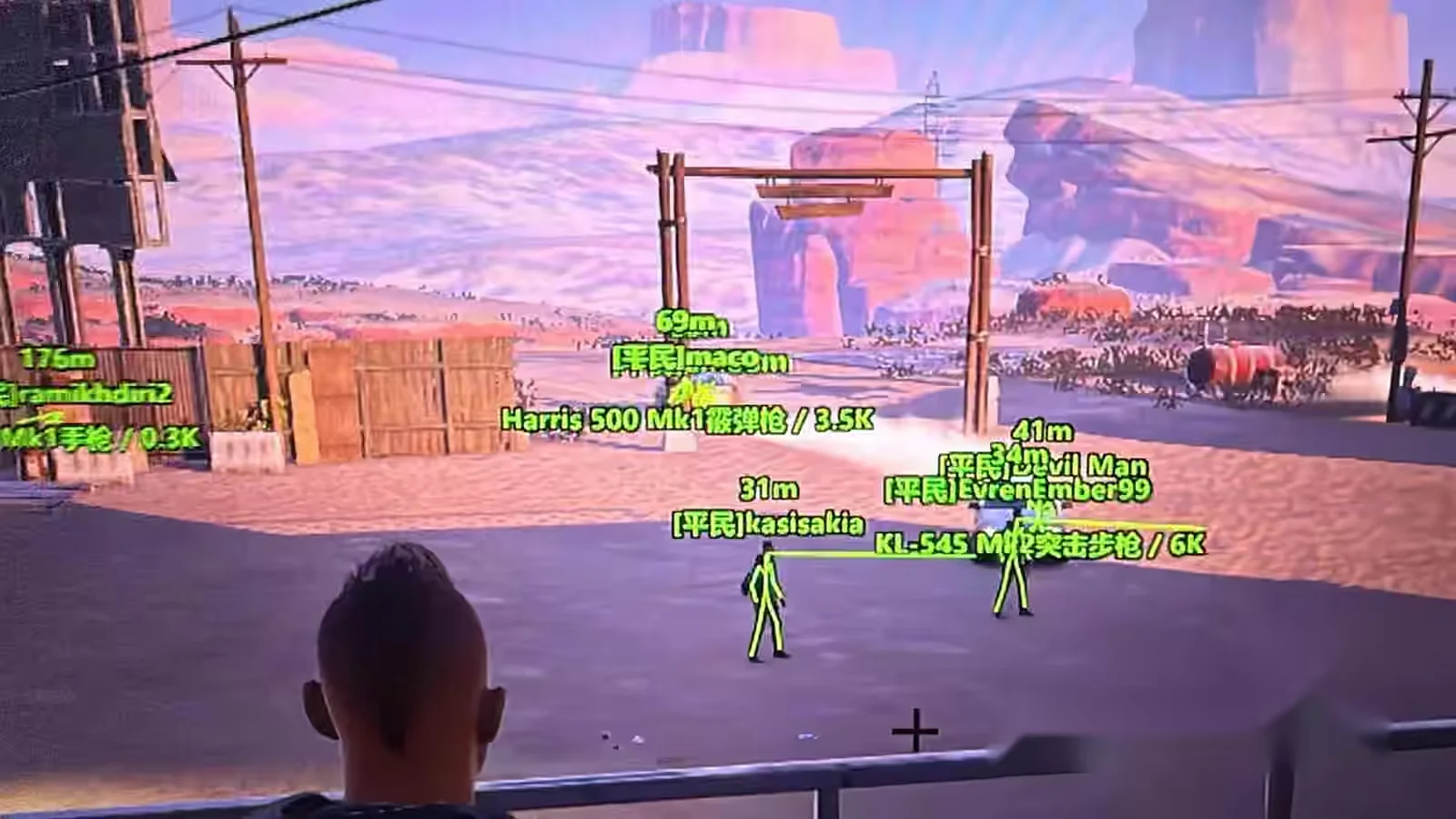
Common settings and their actual effects
First reduce irrelevant information, then adjust the target and display range that are necessary. Proper categorization and distance settings make it easier to read than turning on all the tags at once.
| Set categories | Content can be adjusted | Practical effect |
|---|---|---|
| Character display | Frame, skeleton, name, health, armor, weapon, distance | Retain character information as needed to avoid all text being stacked at the same time. |
| Target screening | Factions, teammates, visibility, falling, death, vehicle status | The limitations need to be focused on the target types that require attention or participation in targeted screening. |
| Targeting parameters | Enable buttons, FOV, smoothness, area, priority, and maximum distance | Control the target selection range and the way the reticule moves. |
| Item filtering | Item classification, distance, value, empty container, and looted state | Reduce the marking of low-priority materials and display the current required resources more prominently. |
| Radar display | Zoom, size, transparency, distance ring, view pane area, and camp color | Read the surrounding orientation and relative distance in the independent view. |
| Interface management | Chinese language, menu scaling, themes, battle modes, and profile files | Switch between complete information and concise visuals, and reuse personal settings. |
What is needed is not just a perspective box.
Put characters, materials, vehicles, radars, and targeting parameters into a single, filterable Chinese-language menu.
Common questions about ROB RUN support
Common questions about perspective, auto-aiming, item display, Chinese menus, system requirements, and version compatibility.
What features does ROB RUN’s auxiliary function mainly include?
Main features include character perspective, skeletal and bounding box display, character factions and weapon information, auto-aim parameters, item visibility and value display, vehicles and NPC markings, 2D radar, and external screen orientation prompts. Chinese menu and configuration management are also included. Specific features will be adjusted based on the current version.
What is the difference between person perspective and object perspective?
Character perspective is used to display the position, outline, faction, status, weapons, and distance of players or NPCs; item perspective is used to mark the world’s materials such as weapons, ammunition, armor, cash, goods, and containers. Both can be turned on independently and the display distance and color can be set separately.
What parameters can the ROB RUN laser sight adjust?
Common options include enabling buttons, FOV range, smoothness, aiming area, target priority, maximum distance, visibility check, and target lock. Some versions also provide motion prediction, weapon classification configuration, and filtering by faction, teammates, and downed targets.
What are the uses of the radar map and the arrows outside the screen?
The radar map aggregates surrounding figures, units, or vehicles into a separate plane view for easy reading of relative positions and distances; arrows outside the screen indicate the direction of the target beyond the current view. These can be used in conjunction with distance restrictions and camp filtering.
Is a Chinese interface available?
The screenshots show the Chinese menu and global localization effects. Common settings also include categories for characters, aiming, radar, and colors. The scope of localization may vary between different versions; please refer to the current real-time menu for the most accurate information.
Which computer systems does ROB RUN support?
ROB RUN supports Windows 10 and Windows 11, and is available at the Xunhebaite Internet Cafe.
What happens after the game update?
After the game is updated, the author will update it in the cloud within 24 hours. The time it takes to complete the update will be added to the user's time allowance.
What technology is used to support ROB RUN?
Overseas giants develop their own kernel encryption driver technology, intelligently targeting lifelike, smooth shooting to accompany you.
How to get the ROB RUN support?
Click the “Get Now” or “View How to Get” button on this page to enter the get page. First, check the current compatible version, feature list, system requirements, and expiration date, then follow the steps provided on the page.
Get a clear understanding of the roles, resources, and direction in advance, then decide on the next steps.
View the ROB RUN support for current features and compatibility information, and choose the perspective, aim assist, items, and radar modules you really need.
Features and compatibility are based on the current version · Please check the game update status and system requirements before purchasing.Risk warning: This page does not promise “absolute security” or “never being banned.” © 2026 rrrobxx.com All rights reserved. No site may copy, reprint, or mirror the content of this page without written permission.